Extrude supported closed SVG fills into STL shapes with holes. Set width, depth and curve quality, then inspect and download the model in your browser.
Free · No account · Local
Build your model
01 / SETUP
Try a real sample
Closed vector fills become crisp solid logos. Convert text and strokes to paths; scripts, external files, masks and filters are unsupported.
Explore other sample modes
3D preview
02 / INSPECT & EXPORT
EXAMPLE RESULT
See what your image can become
A real conversion made with this tool. Your model will appear here after generation.
Source imageGenerated mesh · digital preview
Example size: 100.0 × 100.0 × 3.0 mm
Choose an image → Set size → Generate → Download STL
STL coordinates are in mm. No colors or textures. Review walls and orientation in your slicer before printing.
FROM IMAGE TO OBJECT
Two real conversions you can repeat
Original inputs, actual generated meshes and downloadable STL files. These are digital previews, not photographs of printed objects.
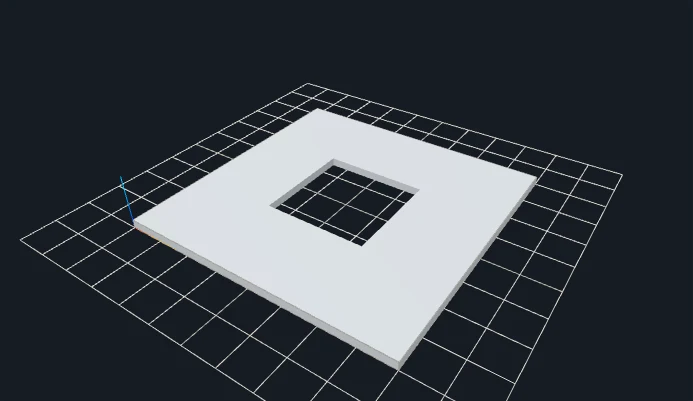
A compound SVG path preserves its hole
Original inputGenerated 3D geometry
The outer ring and inner hole are defined by filled vector paths rather than an image threshold.
SVG describes paths and shapes rather than a rectangular pixel grid. This tool extracts supported closed fills, resolves their contours and holes, samples curves and extrudes the result to a selected depth. Width sets the physical size; the SVG viewBox and transforms supply proportions and placement. Curve quality is a vector sampling control, not the raster Resolution selector used by PNG and JPG modes.
Prepare text and strokes as filled paths in a vector editor before upload. Supported input includes closed paths and basic filled shapes, holes, fill-rule, transforms and viewBox. Open paths, live text, styles, masks, filters, embedded images, scripts and external resources are rejected or require preparation. SVG is parsed as bounded data: uploading a file does not mean every feature of the SVG specification can become geometry.
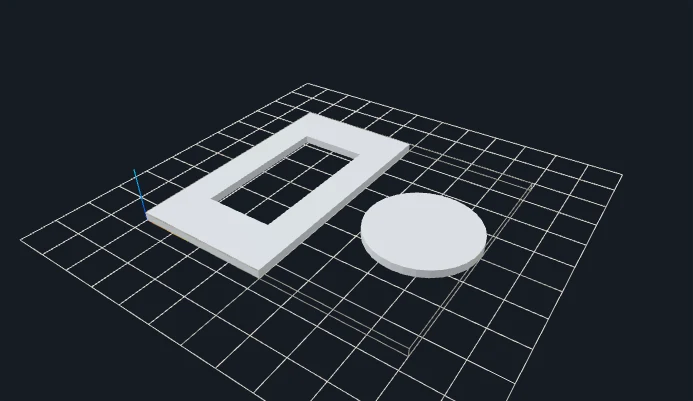
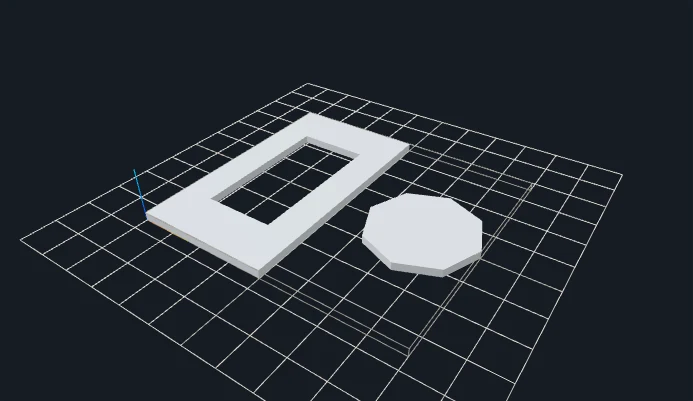
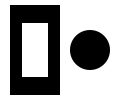
The compound ring example demonstrates an internal hole. The second example uses a transformed ring and a curved island, which produce separate closed shells. Lower curve quality reduces the sampled circle detail; it does not change straight edges in the ring. Overlapping or merely touching rings may be rejected instead of being silently fused. Union intersecting shapes in your editor when you want one connected solid; this converter does not perform general-purpose Boolean repair.
SET THE PHYSICAL SIZE
Parameters that change your result
Control
Starting point
What to inspect
Width
100 mm
Fits the overall vector bounds to a physical width while preserving proportions. SVG coordinates are not automatically printer millimeters.
Extrusion depth
3 mm
Controls constant depth along Z. Thin bridges in the XY outline still require inspection at the selected width.
Curve quality
16 on this page
The second example compares 16 with 4 for the same circular island. More curve segments can increase triangle count without changing the design intent.
Orientation
0° initially
Rotates the prepared outline in the plane. Review the resulting bounds; this is not automatic optimization of print orientation.
CHANGE ONE VARIABLE
A measured parameter comparison
Lower curve quality reduces circle segments and triangle count. Width and depth keep the same physical meaning. Both files use the same input and recorded settings; the single change is shown below.
Closed geometry and dimensions were checked after download. These measurements describe these files; they are not a printability guarantee.
YOUR FIRST CONVERSION
From source to slicer
Convert text and strokes to filled closed paths in your vector editor.
Upload SVG, set width, depth, curve quality and orientation.
Generate and inspect each closed island. Unsupported scripts, external links, masks and filters are rejected.
Download the regenerated STL, confirm its dimensions as millimeters in your slicer, and check orientation, thin details and separate pieces before slicing.
One format, specific limits
STL stores triangles without units, colors or textures. This tool writes coordinates intended as millimeters. Closed-mesh validation checks finite coordinates, oriented shared edges and positive volume; it does not certify your printer, material or every thin feature.
JavaScript and Web Workers are needed for conversion. WebGL enables the interactive preview; if preview initialization fails, an already validated STL can still be downloaded.
BEFORE YOU PRINT
Slicer evidence with a clear scope
The V1 baseline fixture svg-extrude-curve-islands produced actual layered G-code in both slicers. Across the four modes, eight baseline STL files were checked in Bambu Studio and PrusaSlicer. Their recorded files and hashes are retained.
PrusaSlicer: 14 layers, 8,718 extrusion moves.
Bambu Studio: 15 layers, 9,491 extrusion moves.
These are baseline slicing checks, not tests of every gallery parameter variation or physical print. Open your own downloaded model, check dimensions and thin features, and choose settings for your printer.
Closed filled paths, rectangles, circles, ellipses, polygons, multiple shapes, holes, fill-rule, transforms and viewBox. Text, open paths, strokes, styles, masks, filters, images and external resources need preparation first.
Why did extrusion reject my logo?
Intersecting or touching rings and invalid contour topology are rejected. Simplify and separate shapes in your editor; the tool does not attempt complex automatic Boolean repair.
Will separate vector shapes be connected for printing?
No. Valid independent contours form separate closed shells. A ring and a disc are still separate parts; add a real connecting region or backing design in your vector editor if needed.
Should I increase raster resolution for a SVG?
No. Vector extrusion uses Curve quality for sampled curves. Raster Resolution belongs to image-based modes and is not a substitute for fixing an open or intersecting SVG contour.
Files stay on your device. Desktop: up to 20 MB / 8 million pixels. Touch phones: 10 MB / 4 million pixels. SVG: 1 MB with bounded complexity. PNG, JPG, WebP and prepared SVG only. Use original or permitted artwork; model conversion does not grant image or trademark rights.