Convert transparent PNG images into STL cutouts with holes, or make a brightness-based relief. Set width and thickness; processing stays on your device.
Free · No account · Local
Build your model
01 / SETUP
Try a real sample
A transparent alpha mask or dark brightness threshold becomes a solid cutout. Internal holes and separate islands are preserved. JPG has no transparent background.
Explore other sample modes
3D preview
02 / INSPECT & EXPORT
EXAMPLE RESULT
See what your image can become
A real conversion made with this tool. Your model will appear here after generation.
Source imageGenerated mesh · digital preview
Example size: 80.0 × 80.0 × 2.4 mm
Choose an image → Set size → Generate → Download STL
STL coordinates are in mm. No colors or textures. Review walls and orientation in your slicer before printing.
FROM IMAGE TO OBJECT
Two real conversions you can repeat
Original inputs, actual generated meshes and downloadable STL files. These are digital previews, not photographs of printed objects.
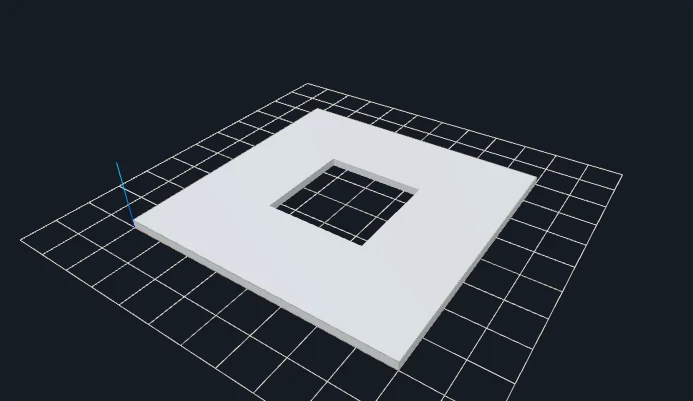
Transparent square ring with a real center hole
Original inputGenerated 3D geometry
Alpha keeps the background and center empty. Threshold does not remove the alpha hole.
Alpha cutouts and photographic PNGs need different modes
PNG can store an alpha channel as well as color. In Silhouette mode, this tool gives alpha priority when the decoded source includes transparency. The background and transparent holes stay outside the solid. An opaque PNG instead uses a dark brightness threshold to choose foreground pixels. A white-looking background in an image editor is not proof that the file contains actual transparency.
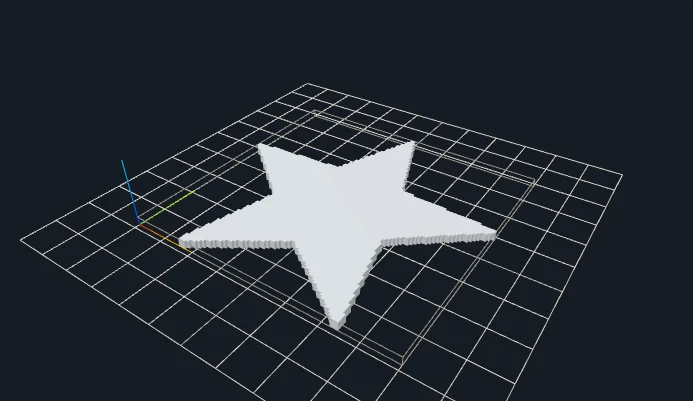
A PNG photo is usually better suited to Relief than Silhouette. Relief keeps a rectangular base and interprets tonal changes as height; it does not cut every colored region into a separate shape. The default on this page is a transparent outline at 80 mm wide and 2.4 mm thick. The two examples compare a ring with a central hole and a star with narrow tips, so you can inspect two distinct types of edge rather than just changing a filename.
Raster edges are sampled on a bounded grid. At a small final size, an edge that looks smooth at screen resolution may turn into steps or a fragile tip. The star example uses Smoothing 1 because its unsmoothed 128-grid contour was rejected. This prepares that sample; it is not a promise that smoothing will fix every image. If a contour still fails, simplify the source or use a closed SVG for an outline you can control directly.
SET THE PHYSICAL SIZE
Parameters that change your result
Control
Starting point
What to inspect
Width
80 mm
Fits the foreground outline to the chosen width. Inspect the narrowest remaining features at this physical scale.
Extrusion thickness
2.4 mm
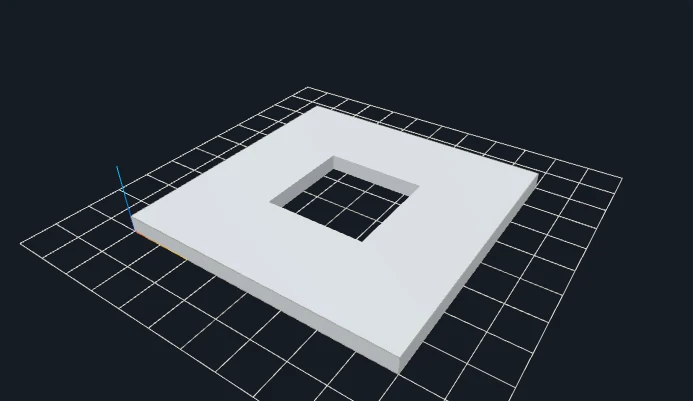
Makes a constant-thickness cutout. The experiment below doubles this to 4.8 mm without changing the alpha outline.
Threshold
Opaque PNGs only
Changes which dark pixels are included when the source has no transparency. Alpha takes priority for transparent sources.
Smoothing / resolution
Star: 1 / 128
Smoothing can remove tiny raster edge details. Resolution 256 is the normal starting grid; these downloadable demonstrations explicitly use 128.
CHANGE ONE VARIABLE
A measured parameter comparison
Doubling extrusion thickness doubles the Z dimension and volume for this unchanged outline. Both files use the same input and recorded settings; the single change is shown below.
Closed geometry and dimensions were checked after download. These measurements describe these files; they are not a printability guarantee.
YOUR FIRST CONVERSION
From source to slicer
Choose PNG with a clear alpha edge; use Relief for photographic PNGs.
Set thickness and width. Threshold affects opaque images; alpha takes priority when transparency exists.
Generate and inspect holes and small islands before exporting the STL.
Download the regenerated STL, confirm its dimensions as millimeters in your slicer, and check orientation, thin details and separate pieces before slicing.
One format, specific limits
STL stores triangles without units, colors or textures. This tool writes coordinates intended as millimeters. Closed-mesh validation checks finite coordinates, oriented shared edges and positive volume; it does not certify your printer, material or every thin feature.
JavaScript and Web Workers are needed for conversion. WebGL enables the interactive preview; if preview initialization fails, an already validated STL can still be downloaded.
BEFORE YOU PRINT
Slicer evidence with a clear scope
The V1 baseline fixture silhouette-ring produced actual layered G-code in both slicers. Across the four modes, eight baseline STL files were checked in Bambu Studio and PrusaSlicer. Their recorded files and hashes are retained.
PrusaSlicer: 14 layers, 8,016 extrusion moves.
Bambu Studio: 15 layers, 8,893 extrusion moves.
These are baseline slicing checks, not tests of every gallery parameter variation or physical print. Open your own downloaded model, check dimensions and thin features, and choose settings for your printer.
Avoid raster sampling for prepared vector artwork.
PRACTICAL ANSWERS
Questions about PNG to STL Converter
Why does threshold not change my transparent PNG?
When any source pixel has transparency, the silhouette uses alpha as its mask. Use an opaque image if you want brightness-threshold segmentation.
Can PNG export its original colors to STL?
No. STL contains triangles, not image colors or texture. The preview color is a display aid.
Why is my supposedly transparent background included?
Check whether the source really has alpha. If it is an opaque image of a checkerboard or white background, the tool uses brightness thresholding. Prepare actual transparency or adjust an opaque dark-on-light source.
Is SVG better for my PNG icon?
A prepared vector may give better control over curves and holes. Increasing raster resolution cannot recover a vector path that is absent from a low-resolution PNG. See the SVG tool for filled-path requirements.
Files stay on your device. Desktop: up to 20 MB / 8 million pixels. Touch phones: 10 MB / 4 million pixels. SVG: 1 MB with bounded complexity. PNG, JPG, WebP and prepared SVG only. Use original or permitted artwork; model conversion does not grant image or trademark rights.